
| User Roles |  Admin Admin |  Staff contributor Staff contributor |  External Contributor External Contributor | ✗Pulse user |
This article explains how to generate abridged or filleted accounts using the Overview template. The process is quick and does not affect your existing accounts.
Choose the report type
- Open the Overview template.
- Select the required type of report.
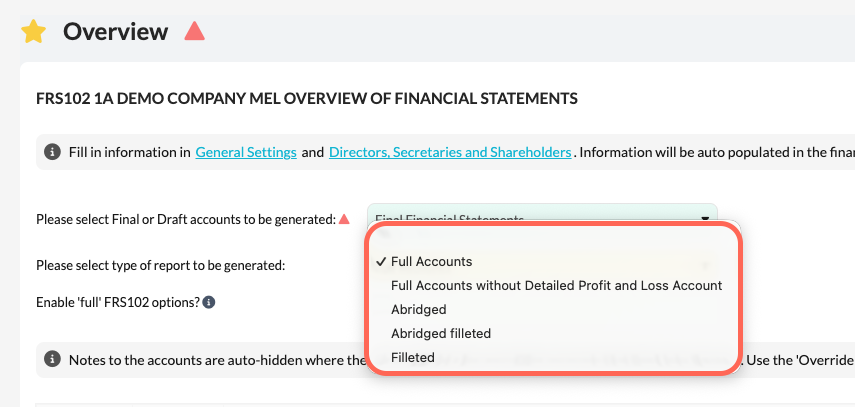
- The system automatically scopes out templates that are not needed.
Filleted accounts
When you select Filleted accounts, all unnecessary templates are fully excluded.
On the Overview template, you can clearly see which templates have been scoped out and will not be included in the report. This his will also filter through to any exports generated.
Abridged accounts
Abridged accounts work in a similar way. Templates that are not required are scoped out automatically.
The difference is that you can optionally include specific templates. To do this, select the relevant tick boxes on the Overview template.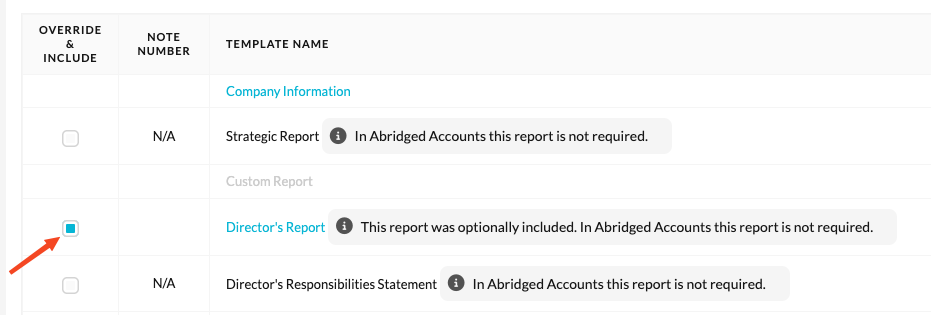
Switching back to full accounts
Changing the report type does not affect your existing accounts. You can switch back to Full accounts at any time.