
| User Roles |  Admin Admin |  Staff contributor Staff contributor |  External contributor External contributor | ✗ Pulse user |
In this article, you will learn how to use the 'Check ratios' template within the working papers. This template automatically calculates a number of key financial ratios that provide insight into the liquidity, solvency, and operational health of the company.
➡️ This template is specifically intended for files within the Dutch market.
Table of contents
What does the 'Check ratios' template do?
The template calculates the following financial ratios:
- Current ratio – indicates to what extent the company can meet its short-term obligations using its current assets.
- Quick ratio – similar to the current ratio, but excluding inventory (where applicable).
- Working capital – the difference between current assets and short-term liabilities.
- Operating cash flow – provides insight into the cash flow from business activities.
- Equity position – shows the development and stability of the company’s equity.
These figures are automatically calculated based on the data in the financial statements.
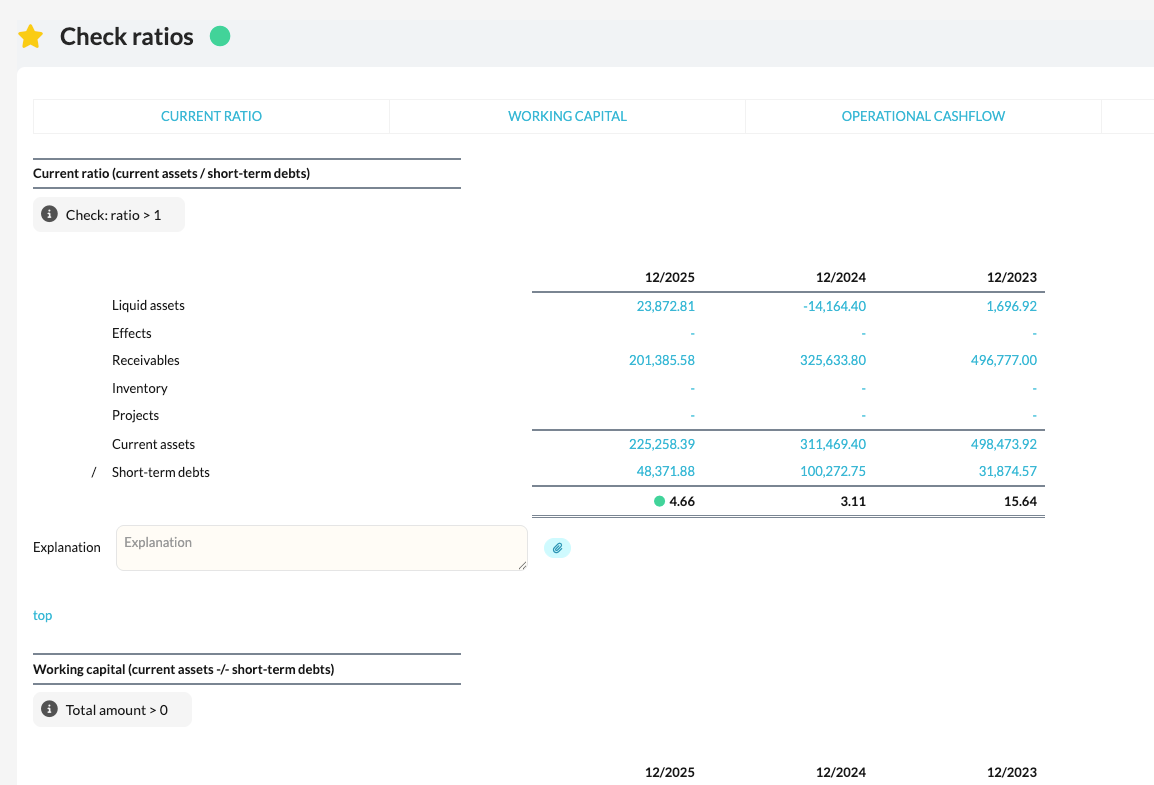
How do you use the calculated ratios?
- The calculated ratios provide a quick overview of the company’s financial health in a single view.
- You can use them to identify trends, flag risks, and assess whether the company can meet its short-term obligations.
- If one or more ratios turn red, this means the value falls outside the expected or safe range.
- In that case, it is important to analyse the underlying figures and, if necessary, note any explanations or actions in the file.