
| User Roles |  Admin Admin |  Staff contributor Staff contributor | ✗ External contributor | ✗ Pulse user |
This article explains how to use the 'Assessments personnel costs' template within the working papers.
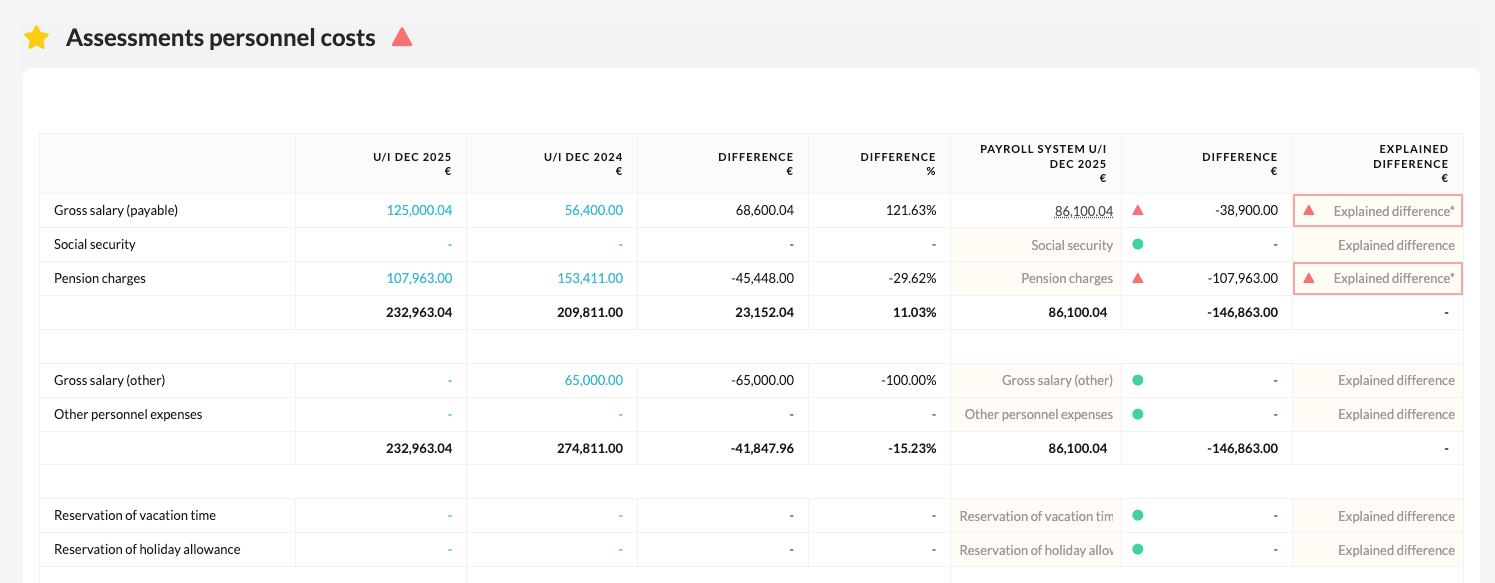
The template provides an overview of the payroll-related amounts coming from the payroll system.
➡️ This template is specifically intended for files within the NL market.
Table of contents
What does the 'Assessments personnel costs' template do?
- The template automatically displays the relevant amounts from the payroll system, so you can easily compare payroll costs with the figures in the bookkeeping.
- When the data comes from Nmbrs, it is automatically loaded into Silverfin.
- This makes the template an efficient and reliable way to check payroll data and reconcile it with the bookkeeping.
What if there is no Nmbrs integration?
If there is no active Nmbrs integration within the file, you can enter the data manually.
Use the 'Payroll system' column for this:
- Copy the amounts from the 'This year' column into 'Payroll system'.
- Note: this is a manual action and must be carried out carefully to avoid errors.
This way you can still fully reconcile payroll costs even without an automatic integration.