
| User Roles |  Admin Admin |  Staff contributor Staff contributor |  External contributor External contributor | ✗ Pulse user |
This article explains how to use the 'Check other operating expenses' template within the working file.
The template helps you analyse the evolution of other operating expenses and explain significant variances compared to the prior year.
➡️ This template is specifically intended for files within the NL market.
Table of contents
- What does the 'Check other operating expenses' template do?
- How do you use the variance check in this template?
What does the 'Check other operating expenses' template do?
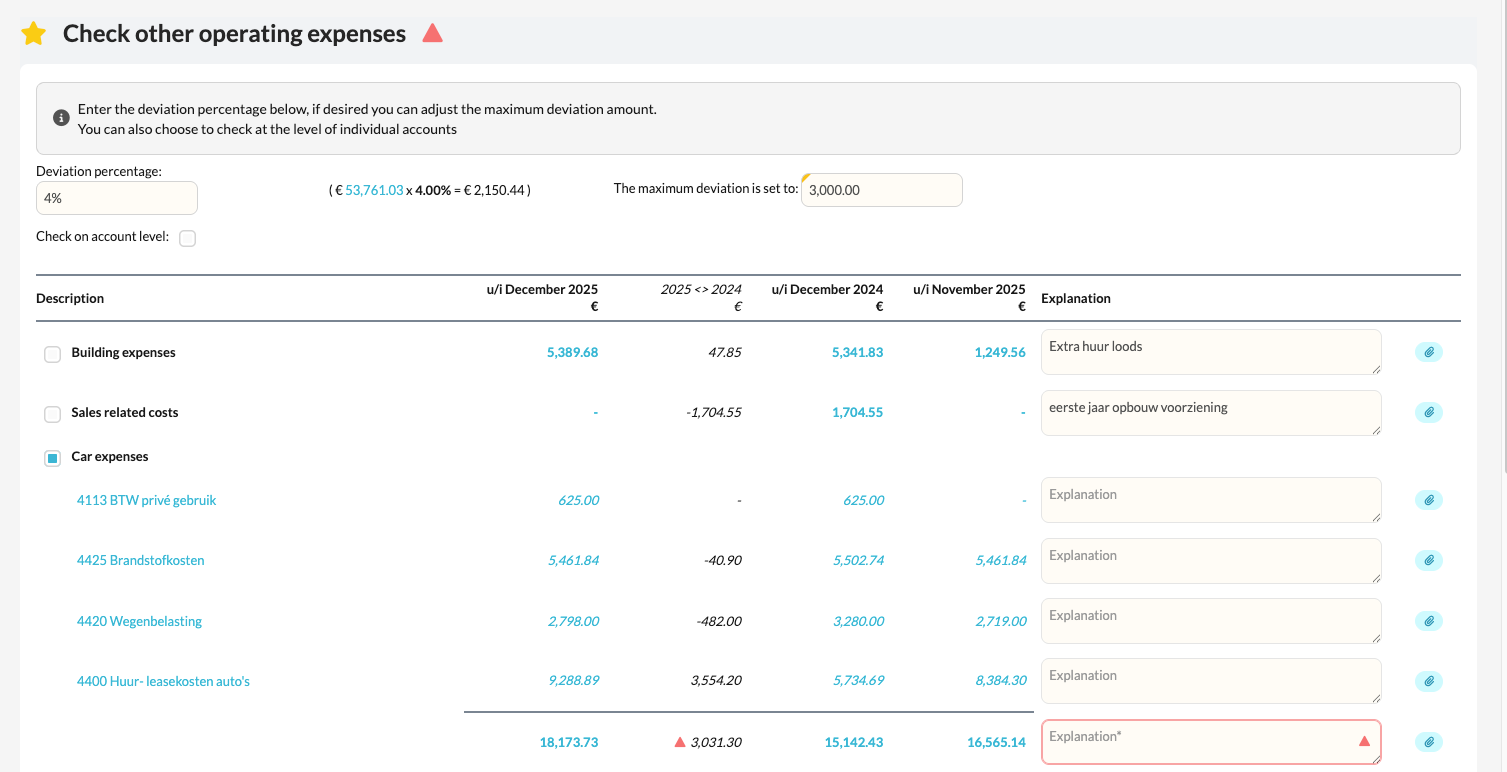
- The template automatically displays all other operating expenses for the file.
- At the top of the template, you can set a maximum variance as a percentage.
- When the difference between the current year and the prior year is greater than the maximum you set, all individual general ledger accounts are displayed.
- This way you can easily see where the variance comes from and which items need further explanation.
How do you use the variance check in this template?
- At the top of the template, set the maximum variance you want (in %).
- Silverfin automatically compares the current-year amounts with the prior year.
- When the variance is greater than the margin you set, the relevant general ledger accounts are broken out.
- For each group with a variance, add a text to explain it.
- At the bottom of the template, tick the box to confirm the check has been carried out and completed.
