
| User Roles |  Admin Admin |  Staff contributor Staff contributor | ✗ External Contributor | ✗ Pulse user |
This article explains how to use the 'Overview notes' template within the Annual Accounts workflow.
This template allows you to determine which notes are included in the annual accounts and to navigate quickly to the linked sections.
Table of contents
What does the template do?
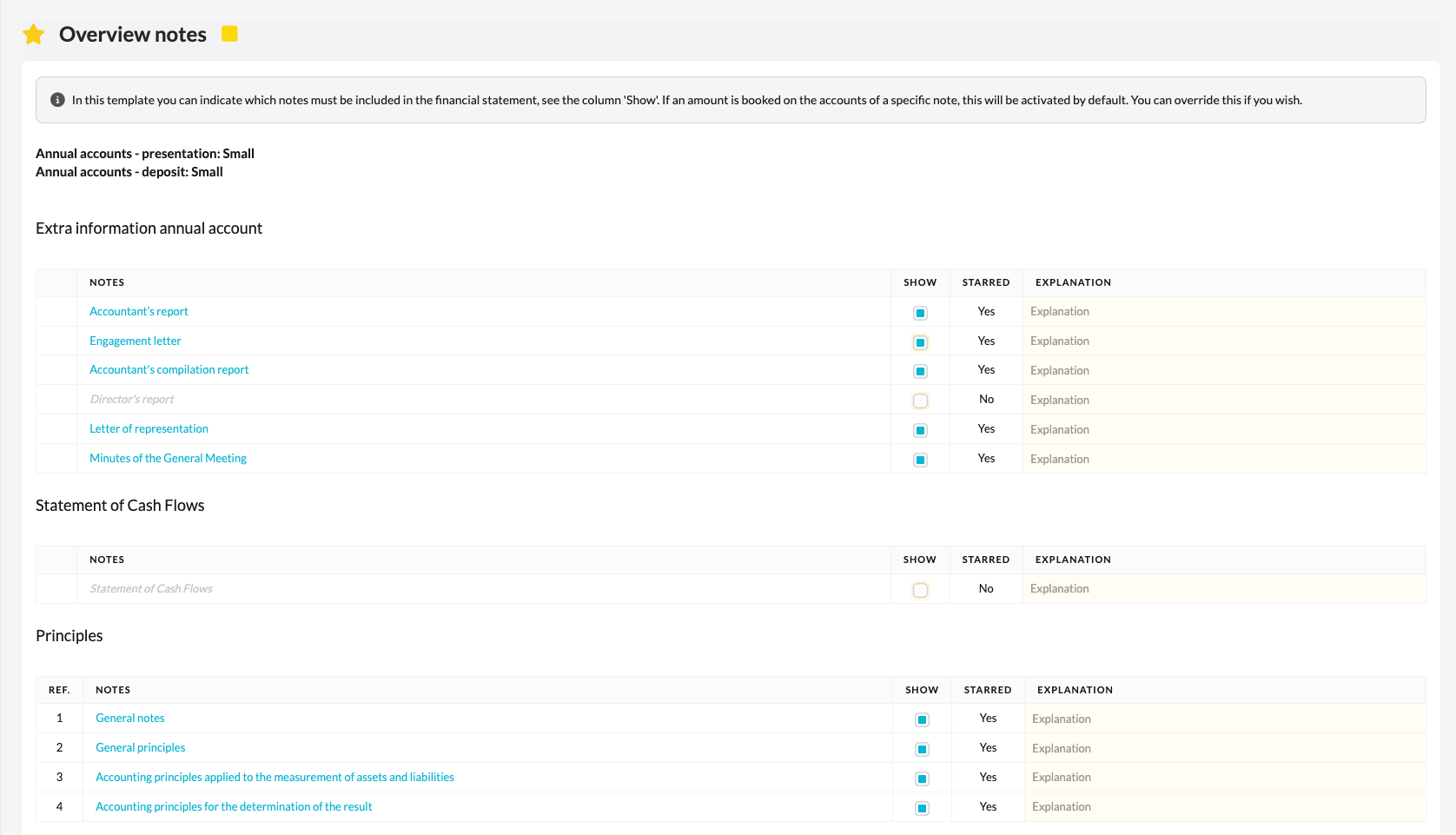
The Overview notes template provides a complete overview of all available notes within the annual accounts workflow.
Here you determine:
- which notes are activated,
- which notes will be visible in the export,
- and which templates you can navigate to via hyperlinks to view or update data directly.
In this way, the template serves as a central checkpoint for the completeness of the annual accounts.
How to proceed
- Open the Overview notes template.
- Select the notes you want to include in the annual accounts.
- Use the hyperlinks to navigate directly to the relevant templates and check or update the underlying data.
- Check that all relevant sections of the annual accounts workflow have been correctly activated (yellow star).
What to watch out for
- If a template in the workflow has a grey star (i.e. it is not active) but has been selected in this template, a warning sign will appear.
→ This means the note will not appear in the export unless the template is activated. - If in doubt, always check that the correct templates are activated via the yellow star in the workflow.
- Make sure all selected notes correspond to the data in the underlying templates.