
| User Roles |  Staff contributor Staff contributor | ✗External contributor | ✗Pulse user |
This article explains how Silverfin’s AI chatbot, Finn, can support you in your daily work. You will learn what Finn is, how it works, how to get the best results from it and when it is helpful to contact our support team instead.
Table of contents
- What is an AI chatbot?
- What is Finn?
- Why use Finn?
- How to get the best results from Finn
- Can Finn answer every support question?
What is an AI chatbot?
An AI chatbot is a smart assistant that understands your questions in normal, everyday language. Instead of relying on fixed keywords or scripted answers, it reads what you type, interprets the meaning and searches for the most relevant information. The goal is simple. It helps you get clear information quickly so you can stay focused on your work.
What is Finn?
Finn is Silverfin’s own AI chatbot. It learns from the articles published in the Silverfin Knowledge Base and uses that information to guide you through tasks, explain features and help you move forward without searching through articles or waiting for a support agent to reply. You can speak to Finn in full sentences, just as you would to a knowledgeable colleague, which makes it easier to describe what you need.
Why use Finn?
Finn is designed to help you get answers faster and with less effort. When you have a question, you can ask it directly from where you are working and Finn will respond immediately. This is especially helpful during peak periods when support queues are busier and you need quick guidance to keep your work moving. Finn is also available outside business hours, so you can get help at any time, even when our team is offline. This reduces interruptions and allows you to keep your workflow moving.
How to access Finn:
- Simply click the Help button in the upper right corner, select Chat.
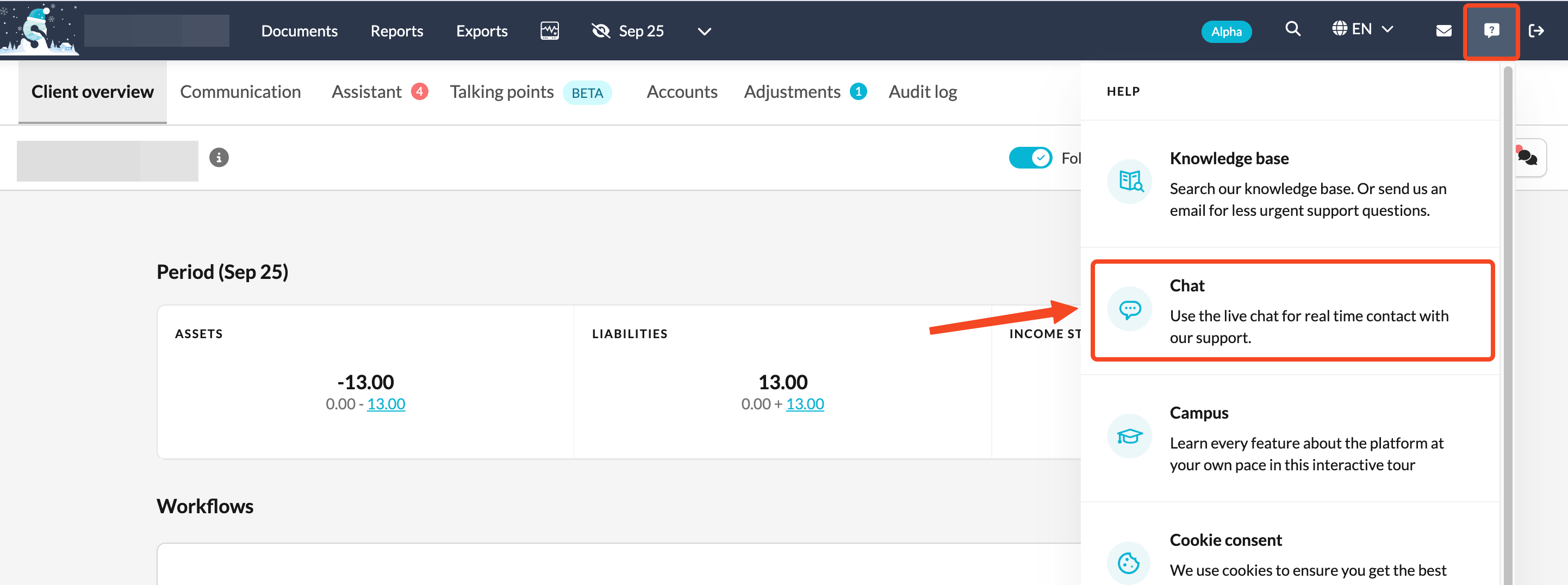
- Choose a relevant topic, ask your question and Finn will guide you from there. This saves time and reduces the need to search through documentation or create a support ticket.

Available topics
When you open the chat, you will be asked to choose a topic. This helps Finn understand the type of question you have and provide the most accurate answer.
Silverfin Platform
Choose this topic for questions about the core features of the Silverfin platform. This includes reports, communication, user management, adjusting periods, client files and other platform functionalities.
Synchronisations
Select this topic if your question relates to bookkeeping or administrative synchronisations and integrations. This covers connections such as Yuki, Exact Online, Horus and other supported systems.
Templates
Use this topic when you have questions about specific account templates or reconciliations that are part of Silverfin workflows. This helps Finn narrow its search to template based guidance.
Finn uses the same structured knowledge our teams rely on, so you can expect consistent explanations based on the most up-to-date information. It is also constantly learning, which means its answers improve over time as it better understands how users interact with Silverfin.
How to get the best results from Finn
Finn works best when you approach it the same way you would approach a knowledgeable colleague. A few simple habits will help you receive the clearest and most accurate answers.
Use full sentences
Describe what you want to do rather than typing one or two keywords. For example, “How do I change the booking year for this client file?” gives Finn much more context than “booking year”.
Be specific
If your question relates to a template, workflow or part of the platform, mention it. This helps Finn narrow down the right guidance.
If you see a synchronisation error, avoid saying only “I have a sync error”. Paste the full message and mention which integration you use. Finn can then connect your steps to the correct solution.
Example:
Do not say:
“Sync error.”
This may lead to an answer that does not match your situation.
Say instead:
“In my file synchronised with Yuki I see the following error: ‘We have reached the daily limit for syncing with Yuki. Please adjust your syncing activity to stay within the limit.’”
Finn will then provide an accurate explanation of the error and the steps you can take to resolve it.
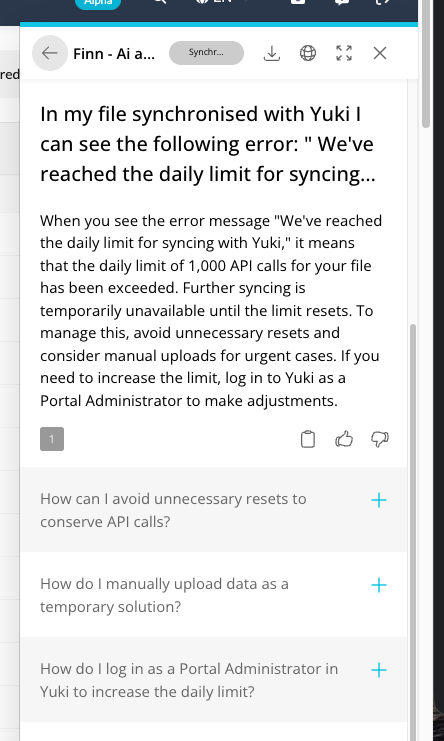
Use follow-up questions
Finn suggests follow-up questions to guide you further. These help refine your request and lead you to the exact answer you need.
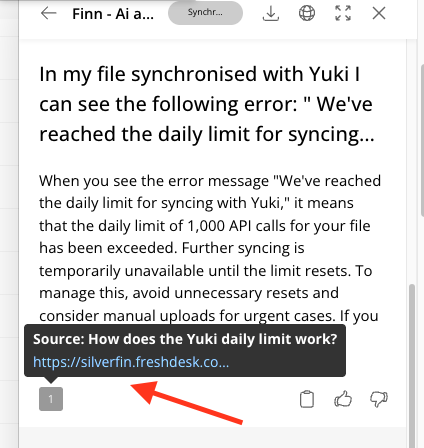
Check the links provided
Finn often includes links to articles that cover your topic in detail. These articles contain steps, examples and visuals that help you solve the issue quickly.
Can Finn answer every support question?
- Finn is very good at explaining features, guiding you through common tasks and answering general questions that apply across Silverfin. It is trained on our official documentation, so it can help you with most day-to-day situations.
- There are still some questions that are too specific or require judgement from a support specialist. This includes situations unique to your firm, unexpected behaviour that needs investigation or cases where personalised advice is required. In those scenarios, Finn will guide you to contact our support team.
- Think of Finn as your first stop. It solves the majority of questions quickly, and when something needs a human expert, you will be directed to the right place without losing time.